Issue 1.1  ·  Emergency lighting

FRANKCAS X3

The monthly test nobody has time to do. X3 runs the EN 62034 test calendar by itself, watches every emergency fitting for faults, and writes the BS 5266-1 logbook as it goes — so the records are already there when the inspector asks.

EN 62034BS 5266-1DALI DT1Tridonic sceneCOM
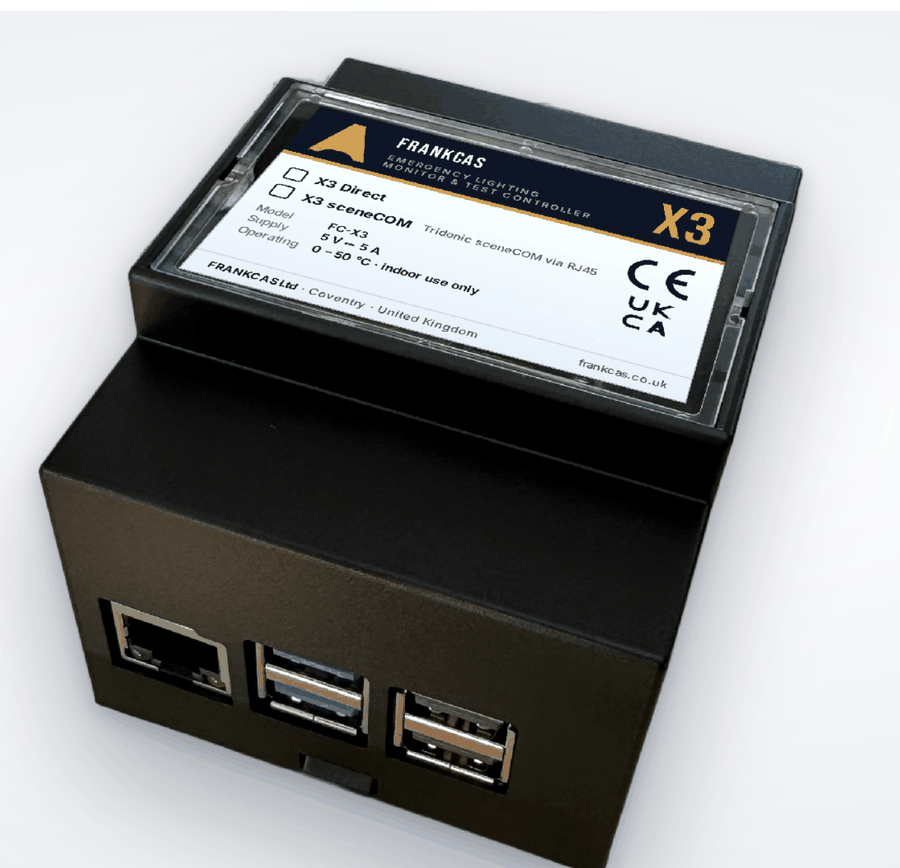
FRANKCAS X3 emergency lighting monitor and test controller, DIN rail mounted, showing Ethernet and USB ports

FC-X3  ·  35 MM DIN RAIL  ·  ON-PREMISES

Why it exists

Emergency lighting has to be tested every month and run to full duration every year, and every result has to be written down. On most sites that means someone with a key, a ladder and a clipboard — and a logbook that is only as good as the last person who remembered. X3 does the testing on a calendar, records the result the moment it happens, and tells you when something fails instead of waiting for you to find out.

Two ways to connect

Straight onto DALI,
or on top of sceneCOM.

Which one you need depends on what is already in the building. Both run the same test calendar, the same logbook and the same reports.

X3 Direct

Onto the DALI line itself

X3 runs the emergency DALI line on its own — no other controller is needed. For sites with no lighting control system, or with a dedicated emergency DALI line.

  • One DALI line, up to 64 short addresses (IEC 62386-202, DT1)
  • Addresses new or re-used fittings for you
  • Switches off each fitting's own automatic tests, so nothing self-triggers
  • Reads lamp, battery and circuit faults, and battery charge

X3 sceneCOM

On an existing Tridonic system

Adds automatic testing and reporting to a sceneCOM evo installation over RJ45, without disturbing the lighting control that is already commissioned.

  • Live fault monitoring through the sceneCOM API (firmware v4 or later)
  • Starts tests and reads each result from the sceneCOM test book
  • Also reads Tridonic DALI-2 air-quality sensors on the same sceneCOM
  • Number of sceneCOMs per X3 depends on the licence

What it does

Testing, records and alerts —
without anyone remembering.

EN 62034 scheduling

Monthly function tests and annual duration tests run on X3's own calendar. Duration tests can be run in batches, so part of every area stays charged while the rest is being tested.

Digital logbook

Every test result, fault, repair and user action is recorded with the date and time it happened — the BS 5266-1 logbook, kept as the work is done rather than written up later.

PDF reports

A logbook report for any period at the click of a button, plus a weekly summary sent by email — the document a client, an insurer or an inspector actually asks for.

Email alerts

Instant alerts for new faults and failed tests, a message when a test run completes, and a warning if X3 loses contact with the lighting system — the failure that usually goes unnoticed.

Built-in web page

Live overview, floor plans, tests and reports from any browser on the site network. Secure HTTPS login, nothing to install, and no cloud account needed to use it.

iotfrankcas.com cloud

Optional link to the FRANKCAS dashboard and mobile app — live status, remote tests and schedules over an encrypted, outgoing-only connection. Entirely your choice to enable.

On screen

The whole site at a glance.

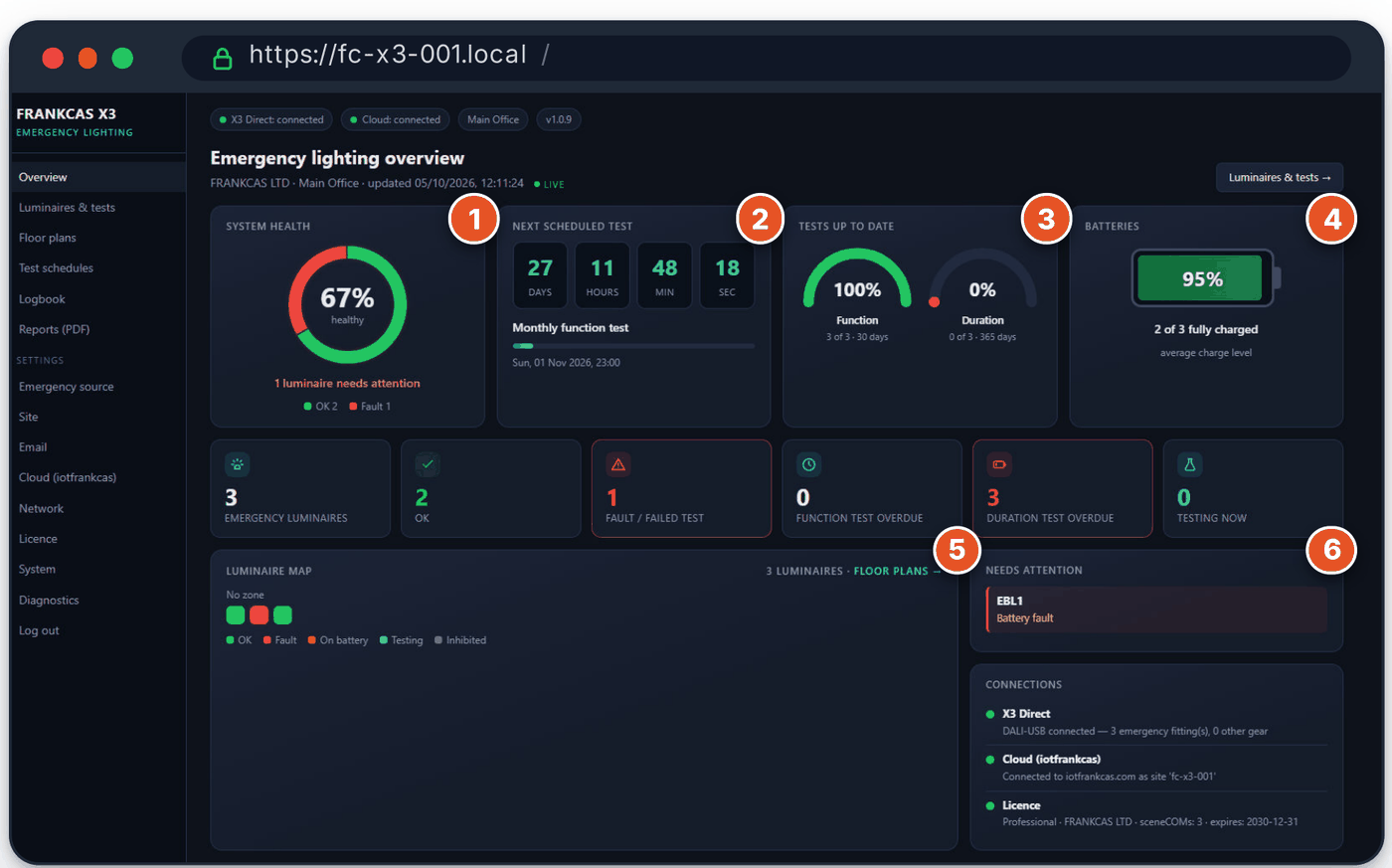
The overview page refreshes itself every few seconds, so a screen left open in the facilities office is always showing the truth rather than this morning's snapshot.

FRANKCAS X3 emergency lighting overview page showing system health, next scheduled test, tests up to date, battery charge, luminaire map and faults needing attention

1  ·  System health

The share of fittings with no fault, and how many need attention right now.

2  ·  Next scheduled test

A live countdown to the next EN 62034 test, so nothing arrives unannounced.

3  ·  Tests up to date

Function tests across 30 days and duration tests across 365, as a percentage.

4  ·  Batteries

Average charge level and how many fittings are fully charged.

5  ·  Luminaire map

Every fitting, coloured by its live state — OK, fault, on battery, testing or inhibited.

6  ·  Needs attention

Faults and failed tests, named as they happen rather than found at the next visit.

Floor plans

Every fitting on
your own drawings.

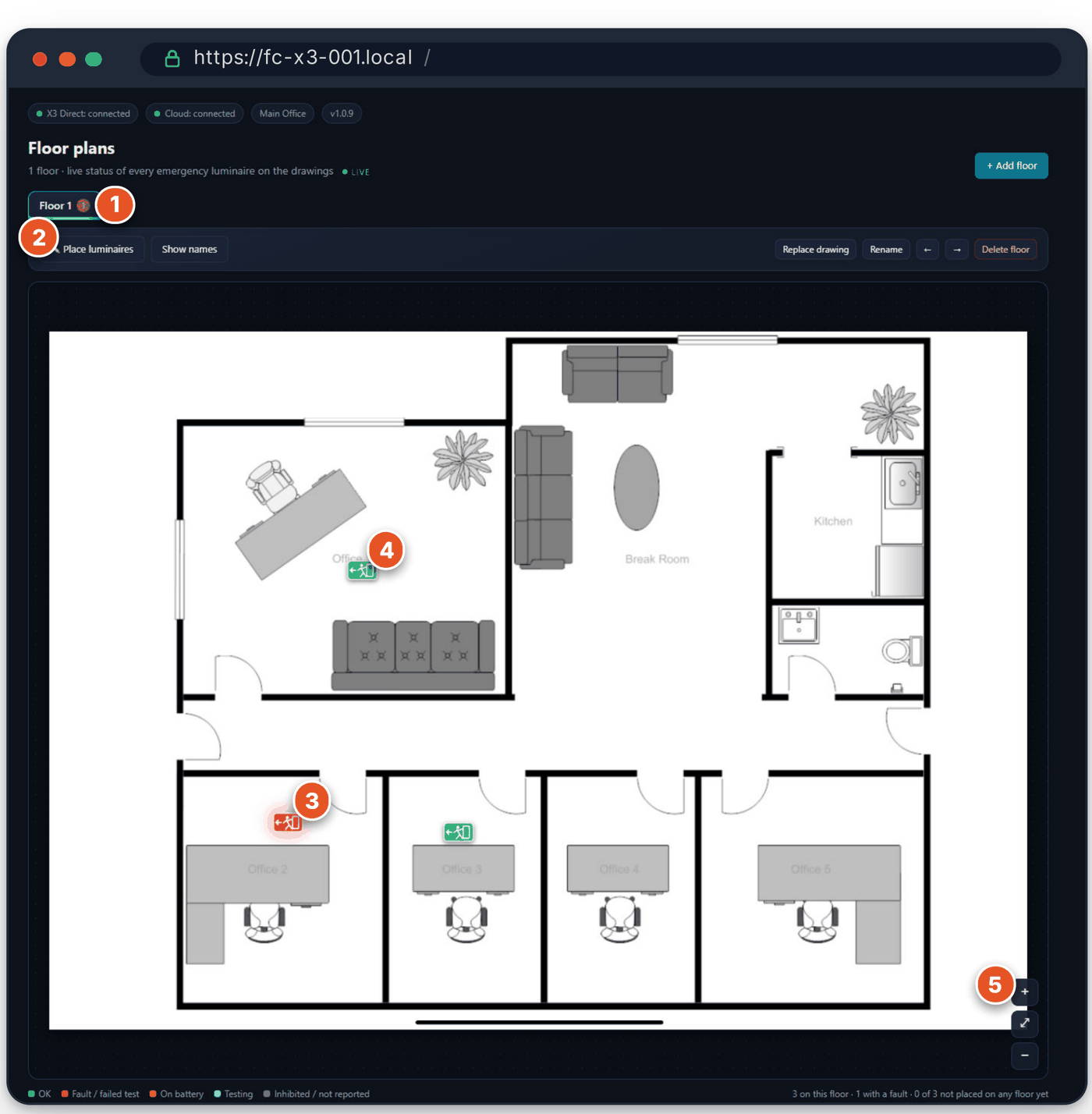
Upload the site drawings and drag each emergency fitting into place. A fault then glows red on the plan, so whoever goes to fix it already knows which corridor to walk down.

FRANKCAS X3 floor plan page with emergency fittings placed on a building drawing, faults highlighted in red
  • Floors — one tab per drawing, with a red badge counting its faults
  • Place luminaires — drag fittings onto the drawing, on a PC or a tablet
  • Faults glow red on the plan, so they are found on site at once
  • Click a fitting for status, battery and last test — or Identify to flash it
  • Zoom and pan for large site drawings

JPG, PNG or PDF, as many floors as you need — each page of a PDF can become its own floor. The drawings are stored on the X3 itself, so a building's plans never leave the site.

Built to be left alone

It has to still be running
in five years.

A test controller that quietly stops working is worse than no test controller, because the logbook keeps looking healthy. X3 is built on the assumption that nobody will check on it.

Storage
NVMe SSD
no SD card to wear out
Watchdogs
HW + SW
automatic restart
Settings
Backup
and restore
Alerting
Loss of contact
warns if the link drops

X2 and X3

The small one does
one job properly.

X2 is the building's command centre — lighting, energy, air quality and emergency, all in one place, on a rackmount appliance. X3 is a DIN-rail box that does the emergency half on its own. They are not alternatives so much as two different starting points.

Choose X3 when

  • Emergency lighting compliance is the problem you are solving
  • There is a consumer unit or panel with DIN rail, and no comms room
  • The site already runs Tridonic sceneCOM and just needs testing on top
  • You want a fixed, self-contained box per building rather than a platform

Choose X2 when

  • You want lighting control, energy and air quality in one interface too
  • The site has a comms room and a rack
  • Casambi is doing the lighting and you need it unified with the DALI side
  • You need ISO 50001 evidence and tariff-based energy cost

Technical specification

Part numberFC-X3
Processor boardRaspberry Pi 5, 4 GB RAM
StorageNVMe SSD — boot and logbook
SoftwareRaspberry Pi OS Lite 64-bit + FRANKCAS X3, updated over the network
Supply5 V ⎓ 5 A (DIN-rail power supply)
Mounting35 mm DIN rail, EN 60715
Operating conditions0 to 50 °C, non-condensing, indoor use
Ethernet1 × Gigabit RJ45 — office network / internet
USB2 × USB 3.0, 2 × USB 2.0
X3 Direct1 DALI line, up to 64 short addresses
X3 sceneCOMSecond Ethernet port (USB adapter) on the sceneCOM network
StandardsEN 62034 test system · BS 5266-1 logbook · IEC 62386-202 DALI DT1
TestsFunction test, duration test, stop — manual, scheduled or from the cloud
MonitoringLamp, battery, charging and communication faults; battery charge
sceneCOMTridonic sceneCOM evo, firmware v4 or later; controllers per licence
Web interfaceHTTPS (port 443) with a per-unit certificate, or HTTP (port 80); password login
Cloud linkMQTT over TLS, port 8883, outgoing only
EmailSMTP with STARTTLS — e.g. Microsoft 365 or Gmail
LicencePer unit, locked to the hardware. Unlicensed units run in demo mode.
ComplianceEU and UK declarations of conformity available on request

Specifications subject to change without notice. Tridonic, sceneCOM and Raspberry Pi are trademarks of their respective owners.
Emergency lighting

Tell us how many fittings,
and what is already on site.

We will tell you whether X3 Direct or X3 sceneCOM is the right fit, how many units a site needs, and what the commissioning involves. If a building already has sceneCOM, this is usually a short job.